Media health
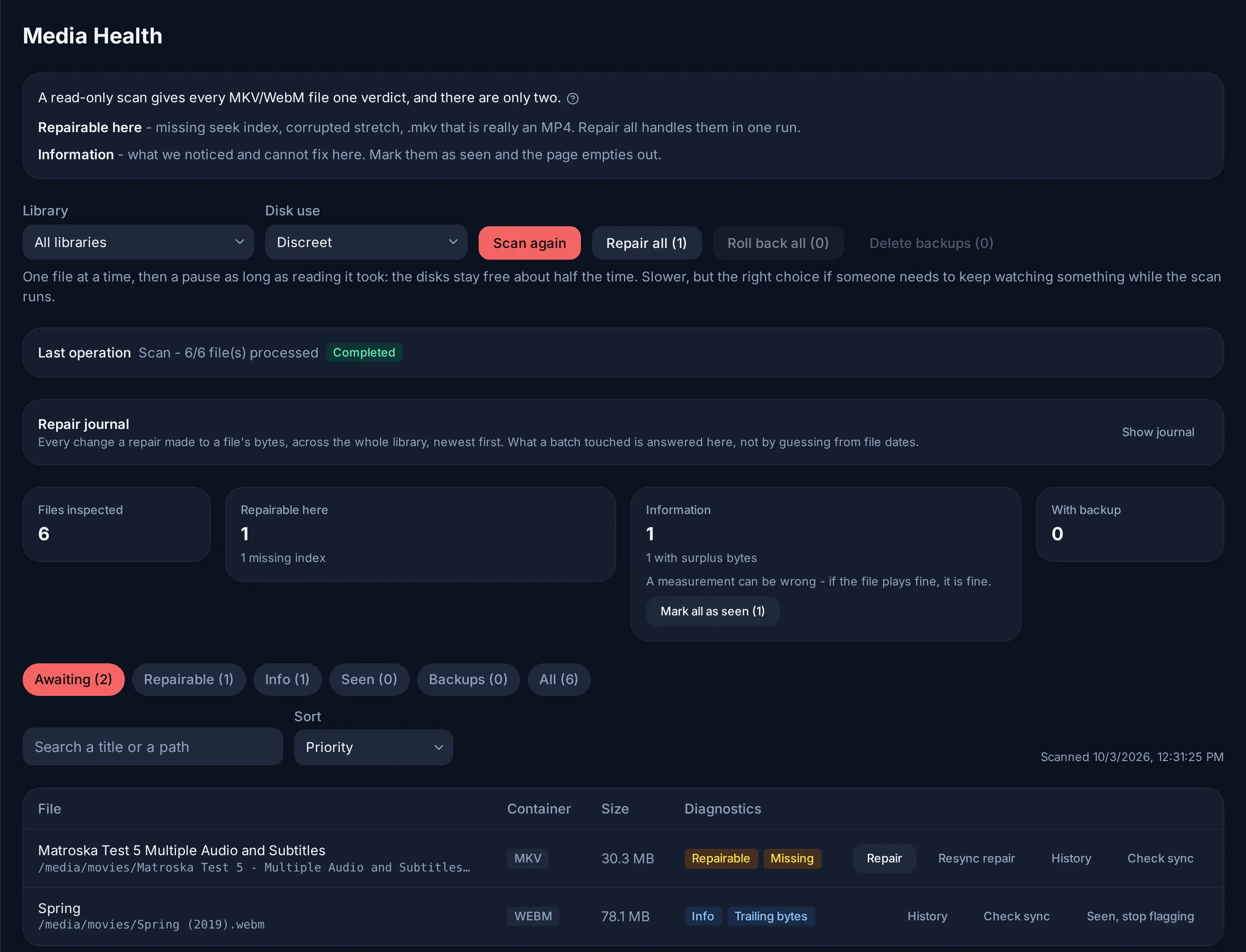
A title seeks slowly, stalls at one point, or its sound drifts: Admin → Media Health reads every MKV/WebM file of your libraries and gives each one a single answer. The aim is a page that empties out: what Evey can fix, it fixes (Repair all); the rest is mentioned once and can be marked as seen.
Two verdicts
A file that is not Healthy (index, container, sizes and audio timing check out) gets one of two answers, and deliberately only two:
| Verdict | What it means | What Evey does |
|---|---|---|
| Repairable | A defect Evey repairs on this server. | Repair all handles them in the background; its count is exactly their count. |
| Info | Something measured about the file that Evey does not rewrite on its own. | Nothing. Mark it as seen. |
Neither asks you for manual work. A measurement Evey cannot act on is only a remark, and a measurement can be wrong: if the file plays correctly, nothing needs doing.
Repairable
- Missing seek index, or one that cannot be used. The symptom is a slow seek or a slow resume. The index is rebuilt in a temporary copy, the copy is checked in full (tracks, duration, index), then it replaces the file.
- Wrong container: the
.mkvis really an MP4 or MOV file. It is renamed to.mp4and the library follows; nothing is rewritten. - Damaged stretch: a corrupted region in the middle of the file. The repair skips it and resynchronises what follows, so those bytes are lost for good. The repair dialog asks for it explicitly (Also resync N damaged files); left unticked, damaged files are not touched. The same applies to a file whose corruption only appears while it is rewritten (Corruption found during repair): the scan reads headers only and could not see it.
- Tracks stored in blocks: minutes of video, then minutes of audio, instead of side by side. No player gets past the first block. Re-mux the tracks rewrites them side by side without re-encoding and checks that every packet made it before replacing the file.
Info
- Incomplete download: the end of the file never arrived. It plays up to the cut. No tool recovers the missing part; only the source does.
- Coarse seeking: the rebuilt index still has a hole, most often the final credits. A seek into the hole lands at its edge; everywhere else seeking is exact.
- Audio at +N s: an audio track starts after the picture. This is how a dub is lined up with a cut, and every player follows it. Evey never rewrites it.
- Audio tracks N s apart: the file's own audio tracks disagree, so one of them is in the wrong place. Nothing measured can tell which one.
- Sound N s off the picture: an audio track is away from where the subtitles, timed to the picture, place the speech.
- Audio track pulled to 0: the mark an earlier repair leaves when it pulled a track back by its declared delay. If the dub now plays early, the removed amount is no longer in the file.
- Audio -N s: an audio track ends before the picture. Playback fills the gap with silence.
- Trailing bytes: surplus bytes after the end of the file's content. It plays fine.
- Unreadable: the scan could not read the file (missing, unreadable, or a container the parser refused). Check the mount or the source.
Checking the sync by eye
For the three audio remarks, Check sync on the file's row builds a short clip on the server: pick a moment, a track and an offset to try, then watch it, slowed down if needed. Comparing tracks says whether they agree, never which one follows the picture; only watching settles it.
Apply N s to this track moves that track by the chosen offset. The change is recorded as your judgement, not as a measurement, and History can undo it.
Marking as seen
Seen, stop flagging (one file) and Mark all as seen (a group) take an Info remark out of the Awaiting view. Only remarks can be marked: a repairable defect gets repaired. The mark belongs to the file as it is: if its size or date changes, the next scan diagnoses it again. Flag again undoes the mark.
The views above the table (Awaiting, Repairable, Info, Seen, Backups, All) and the search box are how you work through a large library: Awaiting is the to-do list.
Scans
A scan reads three small zones of each file (the head, the index near the end and the tail) and reuses the previous answer for a file that has not changed. Disk use sets the pace:
- Discreet: one file at a time, then a pause as long as the read took. The disks stay free about half the time, so someone can keep watching.
- Fast: several files at once, no pause. Noticeably quicker on a library spread over several disks, but playback may stutter meanwhile.
Two things make a scan diagnose everything again: a file that changed, and a new version of Evey whose checks changed. The first scan after such an update is therefore long on a large library; the following ones are quick again.
Backups, history and undo
Keep backups is on by default: every rewritten file keeps its original as a
.mkvgobak next to it. Roll back restores one file, Roll back all the
selected scope, and Delete backups removes them for good. Turned off, only
the last few copies exist during a run and they are removed at its end; each
repair is then verified more deeply before it replaces the file. When keeping a
copy of every file would fill the volume, the page says so before the run.
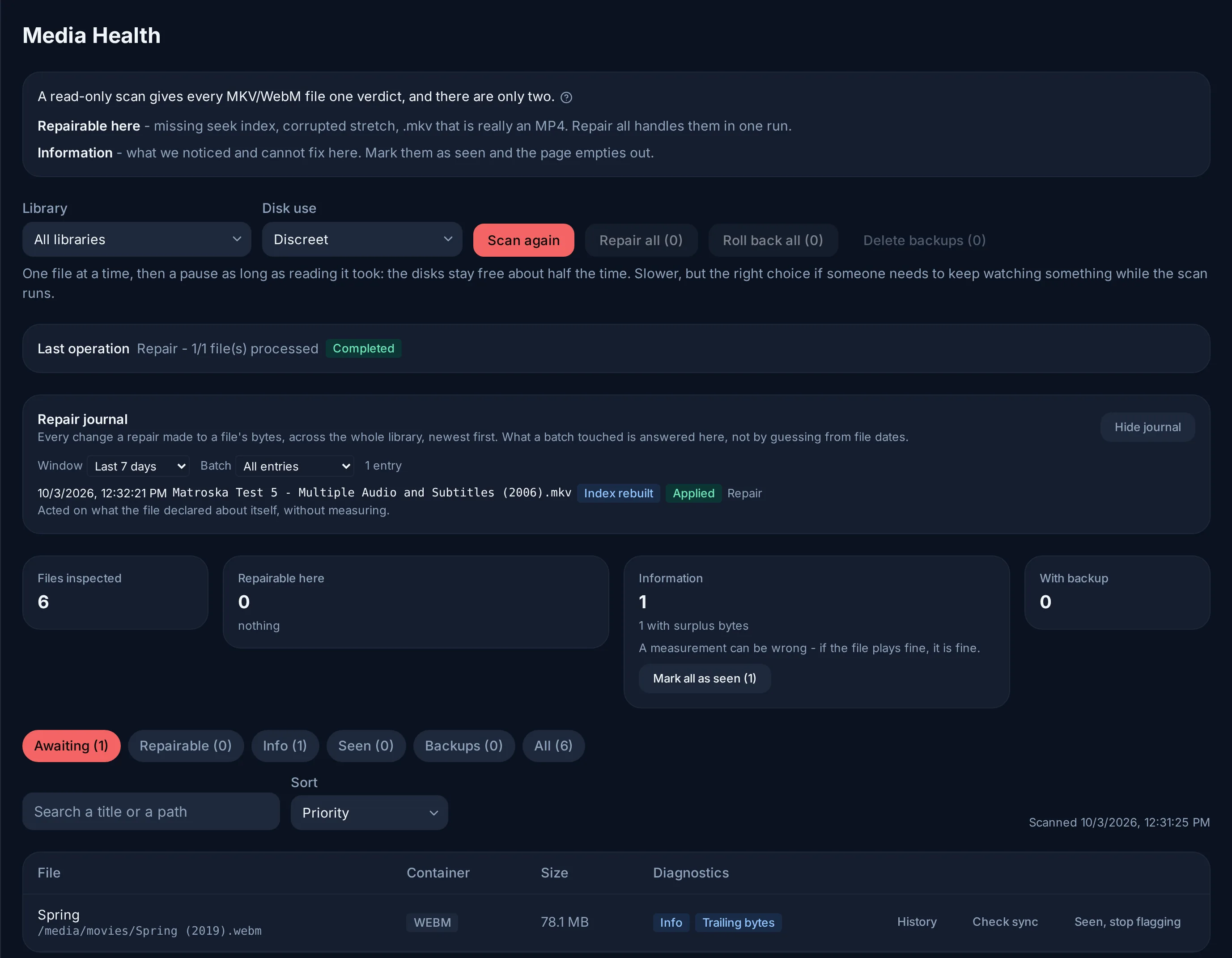
The Repair journal lists every change a repair made to a file's bytes, across the library; History shows it for one file. Some changes can be undone from there without any copy:
| Change | Undo |
|---|---|
| Audio track moved | Applies the exact opposite shift. |
Renamed to .mp4 |
Renames it back. |
| Index rebuilt | Nothing to undo: picture and sound are untouched. |
| Damaged stretch skipped | Only the backup brings the lost bytes back, which is why this repair always keeps one. |
Repairs write into your media folders. They must be mounted read-write in the
container (no :ro on the volume); after a run that met a read-only volume,
the page says so. Scanning works either way.
From the command line
The same engine is available from the operator CLI, see Command line:
evey admin reindex-no-cue --root <dir> [--apply] [--resync]rebuilds the missing indexes, as a dry run unless--applyis given;evey admin validate-streaming --root <dir>prints the read-only streaming readiness report.