Remote access and HTTPS
At home, Evey works at an address like http://192.168.1.20:9091. To watch
from outside your home, you need two more things:
- A public address, for example
https://evey.example.org: a domain name that leads to your home. - HTTPS, so that passwords and videos cross the internet encrypted. Evey does not do HTTPS itself. A reverse proxy does it: a small program placed in front of Evey that handles the secure connection and passes each request on to Evey.
This page shows how to publish the server, then what each setting does.
Publish the server in three steps
- Set up a reverse proxy that handles HTTPS and forwards everything to
Evey's port
9091. You can use the Caddy setup that comes with Evey, or a proxy you already run. Ready-made setups: Reverse proxy configurations. - Tell Evey about it in Admin → Remote Access:
- External URL: your public
https://address. - Trusted proxies (IP or CIDR, comma-separated): only when the proxy
runs in another container. Put its network there, for example
172.16.0.0/12for Docker's default networks.
- External URL: your public
- That is all. Once it has a public address, the server opens remote access by itself.
To check, run docker exec evey-server evey admin doctor. It shows the
trusted proxies in use, and warns when a published server is refusing people
from outside.
Remote access is decided from the public address
Unless you choose yourself, Evey decides at startup:
- The server has a public address (External URL, or the variables
EVEY_SERVER_BASE_URLorEVEY_REMOTE_ACCESS_EXTERNAL_URL): remote access is on. - It has none: remote access is off. Only devices on your home network can connect.
As soon as you switch Enable Remote Access yourself, Evey keeps your choice and stops deciding for you. So a published server can stay home-only if you want.
Remote access only decides who can reach the server. It is not a protection on its own: every page still asks people to sign in.
When remote access is off, someone outside your home is refused on every
page (an error 403). The apps say Remote access disabled instead of a
vague error. If the server can be reached from the internet while remote
access is off, Evey warns you in several places:
- Admin → Remote Access shows Every remote user is locked out;
- the server log says so at startup, then logs each refusal with the address it came from;
evey admin doctorreports it as a failure.
Settings
All in Admin → Remote Access. Every setting applies without a restart: network settings from the next request, the bitrate from the next playback.
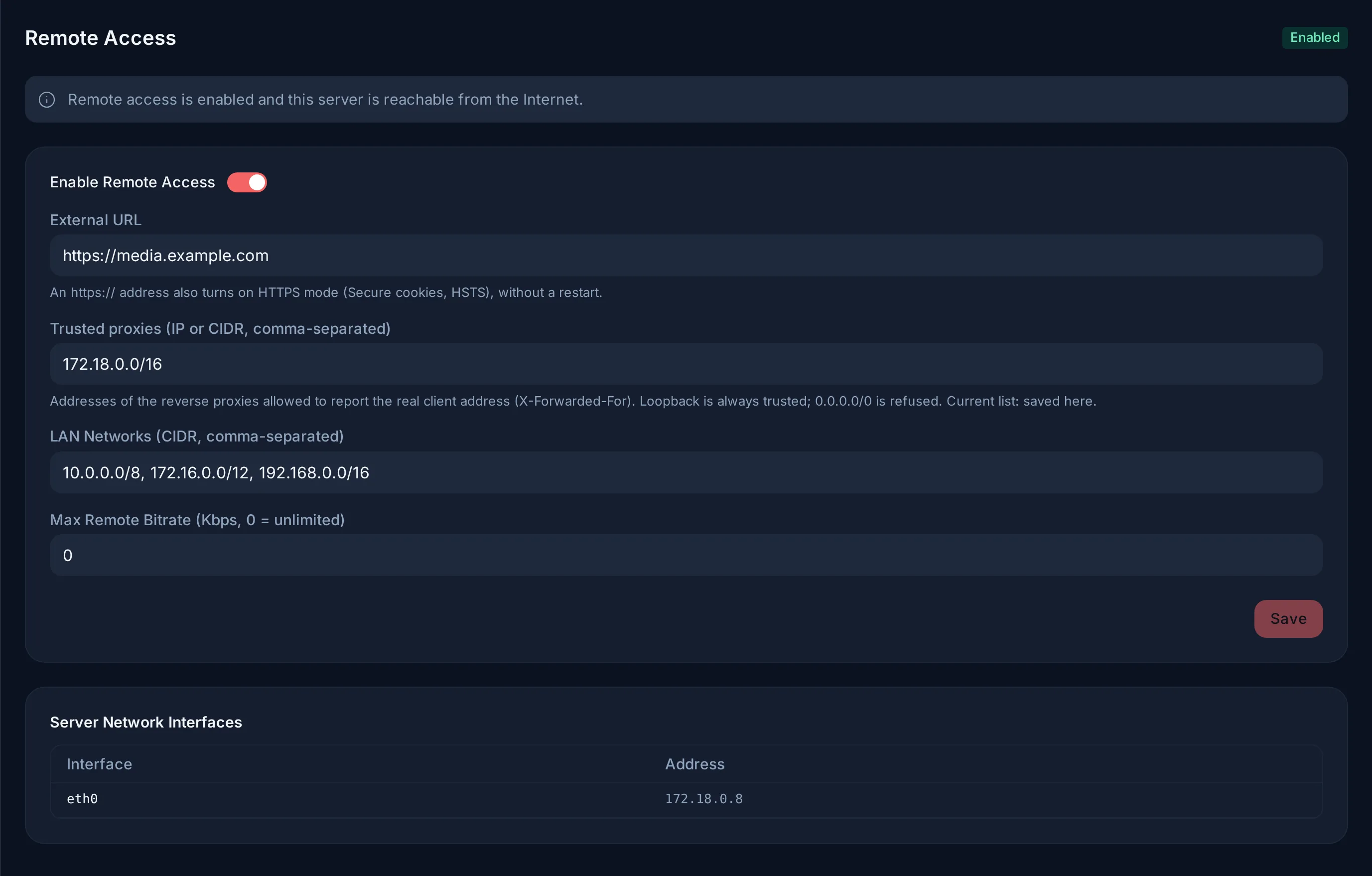
https:// address behind a proxy on the Docker network.| Setting | What it does |
|---|---|
| Enable Remote Access | On: people outside your home network can connect like anyone else. Off: they are refused (403). |
| External URL | Your public address. Links in e-mails, single sign-on and casting use it. An https:// address also turns on HTTPS mode (below). |
| Trusted proxies (IP or CIDR, comma-separated) | The reverse proxies Evey believes when they say who the real visitor is. The machine itself (loopback) is always trusted. Empty: the list comes from EVEY_TRUSTED_PROXIES. |
| LAN Networks (CIDR, comma-separated) | The address ranges Evey treats as "home". Private ranges are listed by default. If you use a VPN (Tailscale, WireGuard) and want its users to count as home, add its range here. |
| Max Remote Bitrate (Kbps, 0 = unlimited) | A quality limit for people outside your home network. A private address is never limited. If Admin → Transcoding also sets a limit for remote viewers, the lower one applies. See How playback is decided. |
What Evey needs to know about the proxy
Evey answers in plain HTTP on port 9091. The reverse proxy handles HTTPS. Evey needs to know two things about it, both in Admin → Remote Access:
- External URL in
https://. This tells Evey that a proxy handles HTTPS. Evey then protects its sign-in cookies (Secureflag), tells browsers to always use HTTPS (HSTS), and believes theX-Forwarded-Protoheader of a trusted proxy. - The trusted proxies, when the proxy is not on the same machine as Evey.
A proxy in another container needs its network here, for example
172.16.0.0/12for Docker's default networks.
A range covering every address is refused
0.0.0.0/0 or ::/0 as a trusted proxy would let any visitor pretend to
come from anywhere. The panel and evey admin doctor both refuse it. List
the proxy's own address or network instead.
Setting it in the environment instead
The variables EVEY_SERVER_BASE_URL and EVEY_TRUSTED_PROXIES do the same
from the compose file. This suits a setup written entirely as files, or a
server that must answer over HTTPS from its very first start.
When both are set, the panel wins. An https:// External URL turns on
HTTPS mode even if the base URL is plain HTTP, and a saved proxy list
replaces the variable. Empty the field to hand the answer back to the
variable. See Server and network.
The real client address
For remote access and the remote quality limit to work, Evey must see each visitor's real address. Two settings work together:
- The trusted proxies decide whose word Evey takes for the visitor's real address.
- The LAN networks then decide whether that address is "home" or "remote".
If the proxy does not pass the real address on, or Evey does not trust it, every request seems to come from the proxy's own private address. Then everyone counts as home: the remote access setting has no effect, and no remote limit applies.
Fixing the proxy changes who counts as remote
If remote access was off, people outside are refused from the moment the
proxy passes their real address. Run evey admin doctor after changing
proxy settings: it shows the list in use and where it comes from, warns
about a public range, and fails on a range covering every address.