Libraries and metadata
A library is one kind of media (films, series, music or photos) in one or more folders. Evey reads the folders, recognises each file from its name, and fetches its details from the internet: title, summary, poster, cast, ratings. These details are called metadata. For films and series, they come from The Movie Database (TMDB), a free online film database.
The three things you will do first come first on this page: add a library, name your files, fix a wrong match. How scans work, music and photos, collections and the metadata sources come after.
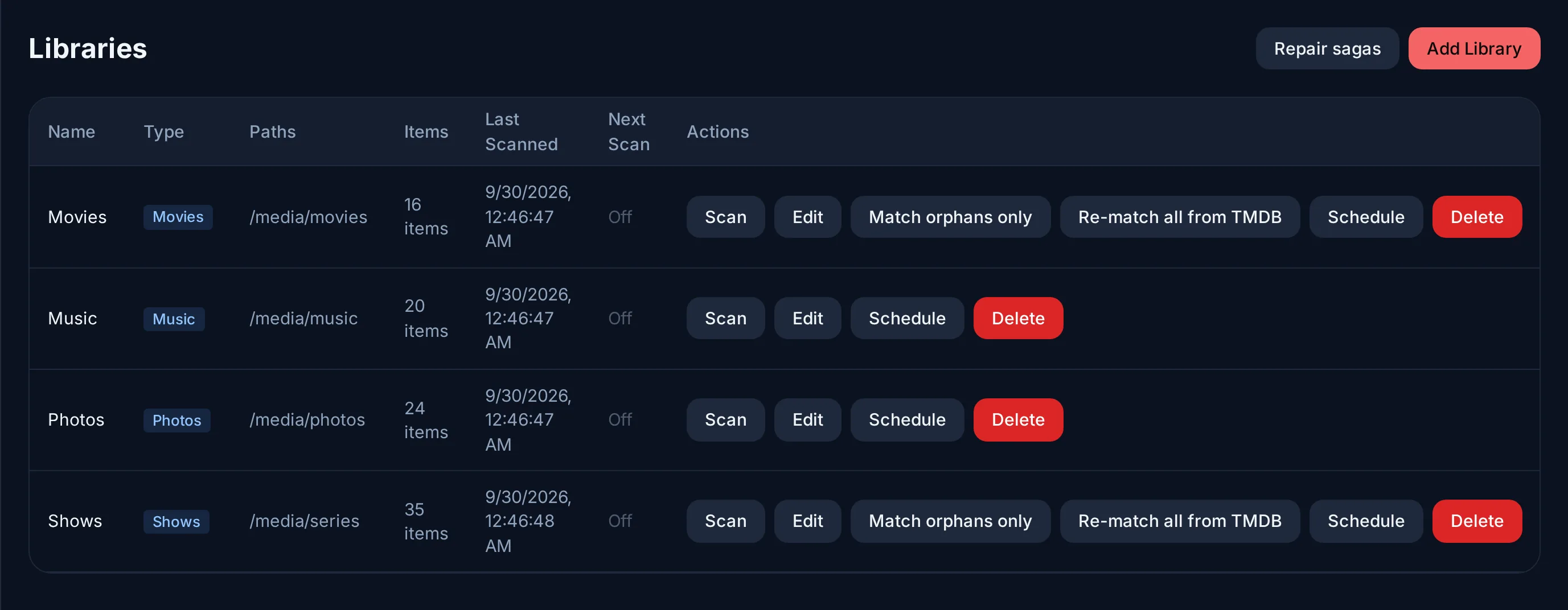
Add a library
- Admin → Libraries → Add Library.
- Give it a Name and a Type. Keep films and series in separate libraries: the type tells the scanner what to look for.
- Under Paths, pick a folder from the list, or Enter custom path... to type one; + Add Path adds a second folder to the same library.
- Press Create Library. Evey reads the folders within a couple of minutes; press Scan on the library's row to start right away. Posters and summaries arrive in the background, so a large library fills in over a few minutes.
| Type | Recognised as | Metadata from |
|---|---|---|
| Movies | One film per file (or per folder) | TMDB, completed by OMDb when a key is set |
| TV Shows | Series, seasons, episodes | TMDB |
| Music | Artists, albums, tracks | The files' tags; covers from the files, the album folder, Cover Art Archive (MusicBrainz), then iTunes |
| Photos | Albums, pictures with their shooting details | The files |
Folders are named as Evey sees them
The folder list shows the folders as Evey sees them, inside its
container. With the compose file from Install, your
media folder is /media. So a folder /srv/media/films on your computer
is /media/films in Evey. A second media folder (/media2) works the
same way.
Name files so they are recognised
The scanner recognises names like these:
/media/films/The Mirror (1999)/The Mirror (1999) 1080p.mkv
/media/films/Lantern.2010.1080p.BluRay.x264.mkv
/media/series/The Outpost/Season 01/The.Outpost.S01E05.720p.mkv
/media/series/Quiet Storm/Quiet.Storm.03x10.mkv
- For a film, the year matters most:
The Mirror (1999). - For an episode, the season and episode number:
S01E05or1x05. - Extra words in the name are ignored: resolution, source, codec, audio,
language tags such as
VOSTFRorMULTI, editions such as "Director's Cut".
If your files carry a word Evey does not ignore yet, add it in Admin →
Server Config → Parser tokens: Extra quality tokens for single words
(HDRIP), Extra edition suffixes for phrases. It applies from the next
scan.
Fix a wrong or missing title
A film shows the poster of another film with the same name? The quickest fix:
- Open the title and choose Edit Metadata.
- Press Identify on TMDB, search for the right title.
- Press Use this match.
Other options in Edit Metadata:
- Edit a field by hand. A value you change is kept: later refreshes do not overwrite it. Changing TMDB ID or IMDB ID fetches the details of that id when you save.
- Refresh metadata fetches the details again for the current match.
- Reset metadata and Re-match metadata start over from the file name and drop your edits. Reset also removes the artwork and cast, and the seasons and episodes of a series.
For a whole library, the row in Admin → Libraries offers:
- Match orphans only tries again for the files that were never recognised. It is fast.
- Re-match all from TMDB searches again for every title. It is slow. Use it after renaming many files.
- Repair sagas joins films that belong to no collection back to their saga, when the other films of the saga are already in the library.
How new files are picked up
You do not need to do anything: a new, renamed or deleted file shows up in Evey within a few minutes.
To force it, or to add a regular full scan, use the library's row:
| Action | What it does |
|---|---|
| Scan | Reads the folders now. The row shows Scanning..., then the result. A folder that could not be read is named. |
| Schedule | A full scan Every 6 hours, Every 12 hours, Daily (3 AM), Weekly (Sunday 3 AM), or on a Cron expression. |
How the server checks the folders
- The server reads every library at each start, then every 2 minutes (Admin → Server Config → Libraries → Periodic scan interval, applied on restart). While something is playing, it waits 15 minutes between reads, so that it does not slow playback down.
- It can also be told by the system when a file changes (Admin → Server Config → Libraries → Library file watcher), for the libraries whose realtime monitoring is on. To check that this still works, it writes a small test file into the folder for a few seconds. A library where this is proven to work is read once an hour instead of every 2 minutes.
- Libraries created from the web panel do not use the file watcher: the reads every 2 minutes pick up their files. The phone app's admin form for a library has a Realtime monitoring switch.
Network shares
On an NFS or SMB share, a file written by another machine sends no signal to the server. The regular reads find it.
Music libraries
The scanner reads MP3, FLAC, M4A, OGG, Opus, WAV and AAC files, and takes each track from its tags: title (the file name when it is missing), artist, album artist, album, year, track and disc numbers, genre. Artists are grouped by album artist, or by artist when that tag is empty.
An album is a folder. Keep each album in one folder. Evey groups tracks
by the folder they are in, not by their album tag. So two folders with the
same album tag make two albums, and an album split into CD1 and CD2
subfolders shows as two. In an album, tracks are ordered by disc number,
then track number, and the album takes the name most of its tracks carry.
The cover is the picture embedded in the files, otherwise an image in the album
folder (cover.jpg, folder.jpg or front.jpg), otherwise Cover Art Archive
(found through MusicBrainz), otherwise iTunes.
Photo libraries
The scanner reads JPEG, PNG, HEIC, WebP, GIF, TIFF and BMP files. A photo's album is its folder, relative to the library folder; a photo at the top level has none, and moving a file to another folder moves it to that album at the next scan. The date taken and the camera model come from the EXIF data of JPEG files; the other formats are listed without them. Thumbnails are resized on the server and kept in the transcoding cache.
Collections
Collections gathers titles under one name, for every account. There are three kinds:
- TMDB Collections: the sagas, filled in on their own when TMDB places a film in one. Repair sagas (above) catches films that missed theirs.
- New collection: a list an administrator fills by hand, with Add to collection on a title or on a selection, and puts in order.
- New smart collection: rules on Genre, Year, Type, Rating ≥ and Library, which a title must all meet. Its content is worked out each time it is opened, so new titles appear without doing anything.
Only administrators create and edit collections. Anyone can browse them, and Download collection on the web gets the original files as one ZIP (up to 1000 titles), leaving out what the account's library access or age limit hides.
Metadata keys
Evey comes with a TMDB key, so metadata works with no setup. Other sources are optional. To use them, you get a key (a kind of password) from that service and paste it in Admin → Server Config → API Keys. A key set there wins over the same key given in the environment (see Environment: libraries and metadata).
| Key | Adds |
|---|---|
| TMDB (your own) | Your own request quota instead of the shared one. |
| OMDb | A second source for films TMDB knows little about. |
| OpenSubtitles | Searching and downloading subtitles a file does not carry, through the server API (the apps do not offer it yet). See Subtitles. |
| TheIntroDB | Intro, recap and credits timings from a community database: 500 lookups a day with a key instead of 100 without. |
Intro, recap and credits
Evey finds the intro, the recap and the credits of episodes and films, so the players can offer to skip them. The timings come from community databases (TheIntroDB, then IntroDB) when they know the title. Otherwise, the server works them out by analysing the files. An administrator can adjust them by hand for a title, or run the detection again.
Players show Skip Intro, Skip Recap and Skip Credits buttons by default. Auto-skip intros (Admin → Server Config → Libraries, off by default) makes every player skip them on its own.